
AntvDagre Layout
Overview
AntvDagre builds upon the original dagre layout and adds more useful options, such as nodeOrder, edgeLabelSpace, and more. The dagre layout itself is a hierarchical layout suitable for directed acyclic graphs (DAGs), which can automatically handle node direction and spacing, and supports both horizontal and vertical layouts. See more Dagre layout examples, source code, and official documentation.

Configuration
const graph = new Graph({
  layout: {
    type: 'antv-dagre',
    rankdir: 'TB',
    align: 'UL',
    nodesep: 50,
    ranksep: 50,
    controlPoints: false,
  },
});
Options
For more native
dagreoptions, refer to the official documentation. Here, only some core and new options are listed.
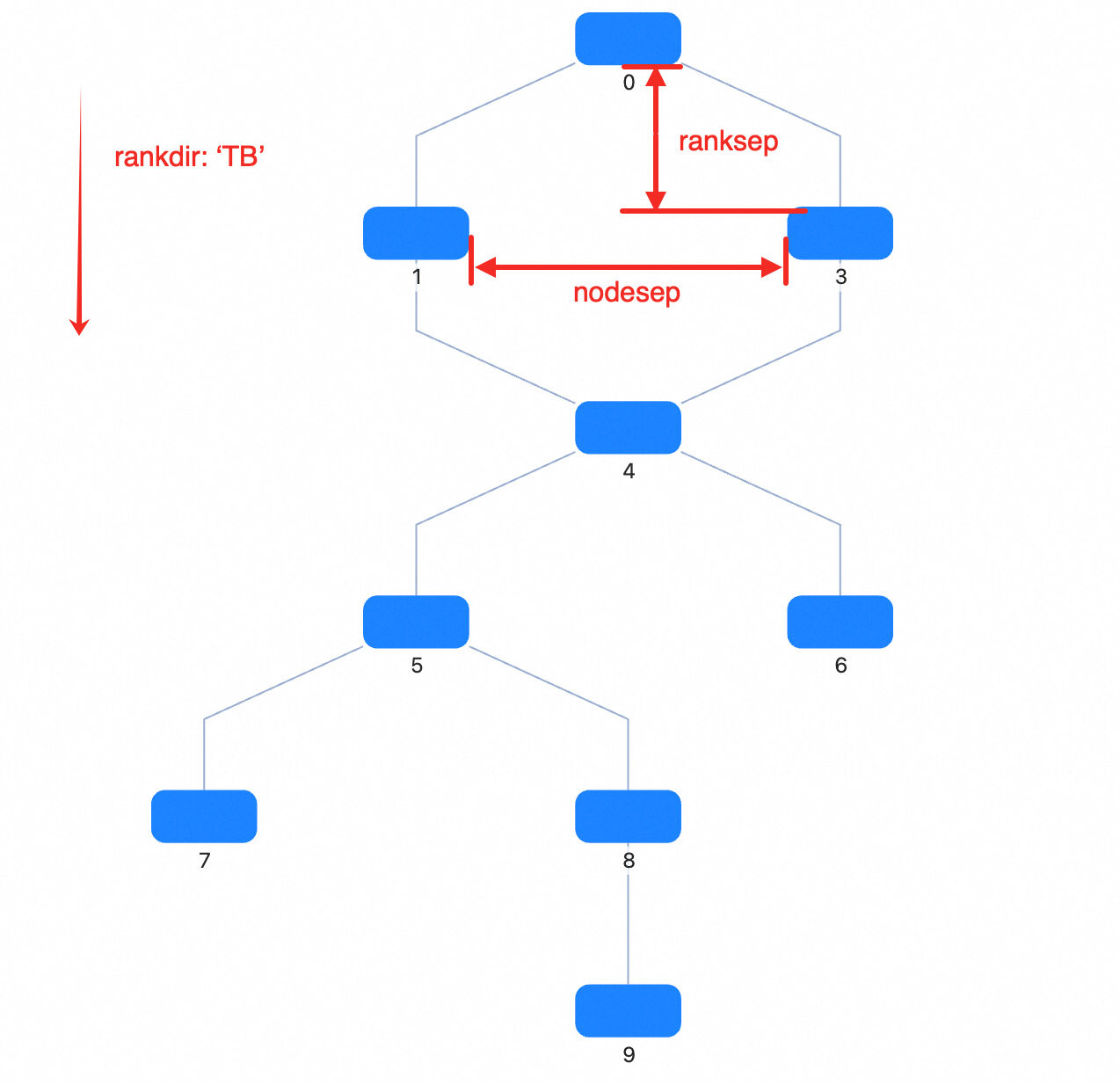
| Property | Description | Type | Default | Required |
|---|---|---|---|---|
| type | Layout type | antv-dagre |
- | ✓ |
| rankdir | Layout direction, options | TB | BT | LR | RL |
TB |
|
| align | Node alignment, options | UL | UR | DL | DR |
UL |
|
| nodesep | Node spacing (px). For TB or BT, it’s horizontal spacing; for LR or RL, it’s vertical spacing. |
number | 50 | |
| nodesepFunc | Callback for node spacing (px), allows different spacing for different nodes. For TB or BT, it’s horizontal spacing; for LR or RL, it’s vertical spacing. Takes precedence over nodesep. |
(d?: Node) => number | ||
| ranksep | Rank spacing (px). For TB or BT, it’s vertical spacing between adjacent ranks; for LR or RL, it’s horizontal spacing. |
number | 50 | |
| ranksepFunc | Callback for rank spacing (px), allows different spacing for different ranks. For TB or BT, it’s vertical spacing; for LR or RL, it’s horizontal spacing. Takes precedence over ranksep. |
(d?: Node) => number | ||
| ranker | Algorithm for assigning ranks to nodes: longest-path, tight-tree, or network-simplex |
network-simplex | tight-tree | longest-path |
- | |
| nodeSize | Specify node size for all nodes or each node, used for occupying space and spacing calculation | Size | ((nodeData: Node) => Size) | - | |
| controlPoints | Whether to keep edge control points. Only effective when using built-in polyline edges (type: 'polyline-edge') or any edge that consumes style.controlPoints as control points |
boolean | false | |
| begin | Top-left alignment position of the layout | [number, number] | [number, number, number] | - | |
| sortByCombo | Whether to sort nodes in the same rank based on parentId in each node’s data to avoid Combo overlap |
boolean | false | |
| edgeLabelSpace | Whether to reserve space for edge labels | boolean | true | |
| nodeOrder | Reference array for node order in the same rank, storing node ids | string[] | - | |
| radial | Whether to use radial layout based on dagre |
boolean | - | |
| focusNode | Focus node, only effective when radial is true |
ID | Node | null | - | |
| preset | Reference node positions for layout calculation, usually used to keep transitions smooth when switching data | NodeData[] | - |
Note: In G6, the control points computed by
antv-dagreare written intoedge.style.controlPoints.
align
DagreAlign Default:
UL
Node alignment: U = upper, D = down, L = left, R = right
UL: align to upper leftUR: align to upper rightDL: align to lower leftDR: align to lower right
rankdir
DagreRankdir Default:
TB
Layout direction. T = top, B = bottom, L = left, R = right
TB: top to bottomBT: bottom to topLR: left to rightRL: right to left
ranker
network-simplex|tight-tree|longest-path
Layout mode
ranksep
number Default: 50
Rank spacing (px)
For ‘TB’ or ‘BT’, it’s vertical spacing; for ‘LR’ or ‘RL’, it’s horizontal spacing. ranksepFunc has higher priority.
ranksepFunc
(d?: Node) => number
Callback for rank spacing (px)
For ‘TB’ or ‘BT’, it’s vertical spacing; for ‘LR’ or ‘RL’, it’s horizontal spacing. Takes precedence over nodesep if set.
nodesep
number Default: 50
Node spacing (px)
For ‘TB’ or ‘BT’, it’s horizontal spacing; for ‘LR’ or ‘RL’, it’s vertical spacing. nodesepFunc has higher priority.
nodesepFunc
(d?: Node) => number
Callback for node spacing (px), allows different spacing for different nodes
For ‘TB’ or ‘BT’, it’s horizontal spacing; for ‘LR’ or ‘RL’, it’s vertical spacing. Takes precedence over nodesep if set.
begin
[number, number] | [number, number, number] Default: undefined
Top-left alignment position of the layout
controlPoints
boolean Default: false
Whether to keep edge control points. Only effective when using built-in polyline edges (type: 'polyline-edge') or any edge that uses style.controlPoints as control points. Adds style.controlPoints to edge data.
edgeLabelSpace
boolean Default: true
Whether to reserve space for edge labels
This affects whether a dummy node is added in the middle of the edge.
focusNode
ID | Node | null
Focus node, only effective when radial is true
- ID: node id
- Node: node instance
- null: cancel focus
nodeOrder
string[] Default: undefined
Reference array for node order in the same rank, stores node ids
If not specified, dagre’s default order is used.
nodeSize
Size | ((nodeData: Node) => Size) Default: undefined
Specify node size for all or each node.
Used for collision detection to prevent node overlap
preset
OutNode[] Default: undefined
Reference node positions for layout calculation
Usually for smooth transitions when switching data. In G6, if updating data, the existing layout result is used as input.
radial
boolean
Whether to use radial layout based on dagre
sortByCombo
boolean Default: false
Whether to sort nodes in the same rank by their parentId to prevent Combo overlap
Recommended to enable when using Combo
Suitable Scenarios
- Flowcharts: Suitable for displaying flowcharts, node direction and spacing are automatically handled
- Dependency Graphs: Display dependencies between packages or modules
- Task Scheduling Graphs: Show dependencies and execution order between tasks
Related Documentation
The following documents can help you better understand the Dagre layout