---
title: "AntvDagre Layout"
description: "AntvDagre Layout"
language: "en"
canonical: "https://g6.antv.antgroup.com/en/manual/layout/AntvDagreLayout/"
version: "5.1.1"
---
## Overview
AntvDagre builds upon the original [dagre](https://github.com/dagrejs/dagre/wiki) layout and adds more useful options, such as `nodeOrder`, `edgeLabelSpace`, and more. The `dagre` layout itself is a hierarchical layout suitable for directed acyclic graphs (DAGs), which can automatically handle node direction and spacing, and supports both horizontal and vertical layouts. See more Dagre layout [examples](/en/examples/layout/dagre/), [source code](https://github.com/dagrejs/dagre/blob/master/lib/layout.js), and [official documentation](https://github.com/dagrejs/dagre/wiki).
 ## Configuration
```js
const graph = new Graph({
layout: {
type: 'antv-dagre',
rankdir: 'TB',
align: 'UL',
nodesep: 50,
ranksep: 50,
controlPoints: false,
},
});
```
## Options
> For more native `dagre` options, refer to the [official documentation](https://github.com/dagrejs/dagre/wiki#configuring-the-layout). Here, only some core and new options are listed.
## Configuration
```js
const graph = new Graph({
layout: {
type: 'antv-dagre',
rankdir: 'TB',
align: 'UL',
nodesep: 50,
ranksep: 50,
controlPoints: false,
},
});
```
## Options
> For more native `dagre` options, refer to the [official documentation](https://github.com/dagrejs/dagre/wiki#configuring-the-layout). Here, only some core and new options are listed.
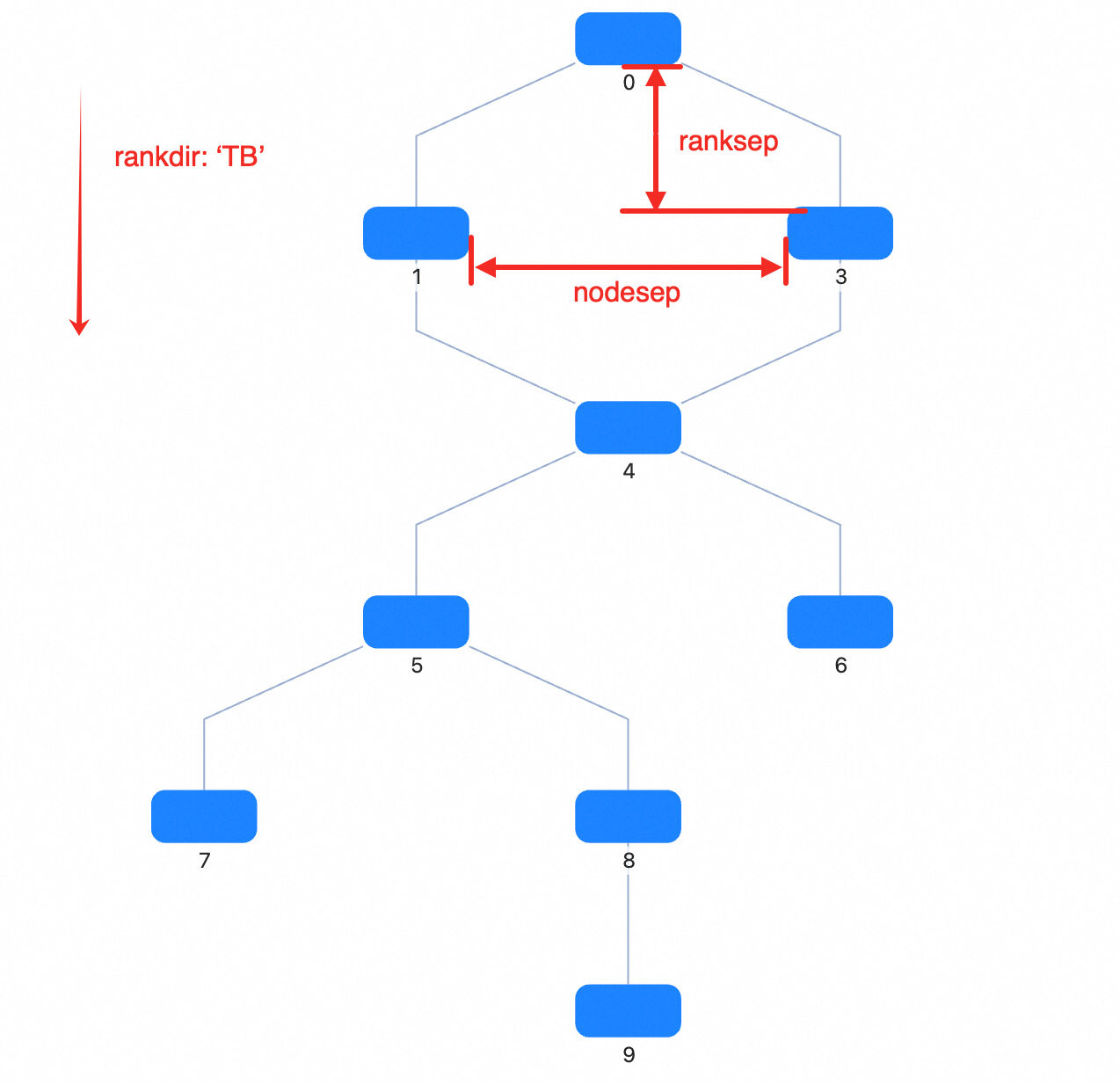 | Property | Description | Type | Default | Required |
| -------------- | -------------------------------------------------------------------------------------------------------------------------------------------------------------------------------------------------- | --------------------------------------------------- | ------- | -------- |
| type | Layout type | `antv-dagre` | - | ✓ |
| rankdir | Layout direction, options | `TB` \| `BT` \| `LR` \| `RL` | `TB` | |
| align | Node alignment, options | `UL` \| `UR` \| `DL` \| `DR` | `UL` | |
| nodesep | Node spacing (px). For `TB` or `BT`, it's horizontal spacing; for `LR` or `RL`, it's vertical spacing. | number | 50 | |
| nodesepFunc | Callback for node spacing (px), allows different spacing for different nodes. For `TB` or `BT`, it's horizontal spacing; for `LR` or `RL`, it's vertical spacing. Takes precedence over `nodesep`. | (d?: Node) => number | | |
| ranksep | Rank spacing (px). For `TB` or `BT`, it's vertical spacing between adjacent ranks; for `LR` or `RL`, it's horizontal spacing. | number | 50 | |
| ranksepFunc | Callback for rank spacing (px), allows different spacing for different ranks. For `TB` or `BT`, it's vertical spacing; for `LR` or `RL`, it's horizontal spacing. Takes precedence over `ranksep`. | (d?: Node) => number | | |
| ranker | Algorithm for assigning ranks to nodes: `longest-path`, `tight-tree`, or `network-simplex` | `network-simplex` \| `tight-tree` \| `longest-path` | - | |
| nodeSize | Specify node size for all nodes or each node, used for occupying space and spacing calculation | Size \| ((nodeData: Node) => Size) | - | |
| controlPoints | Whether to keep edge control points. Only effective when using built-in polyline edges (`type: 'polyline-edge'`) or any edge that consumes `style.controlPoints` as control points | boolean | false | |
| begin | Top-left alignment position of the layout | [number, number] \| [number, number, number] | - | |
| sortByCombo | Whether to sort nodes in the same rank based on `parentId` in each node's data to avoid Combo overlap | boolean | false | |
| edgeLabelSpace | Whether to reserve space for edge labels | boolean | true | |
| nodeOrder | Reference array for node order in the same rank, storing node ids | string[] | - | |
| radial | Whether to use radial layout based on `dagre` | boolean | - | |
| focusNode | Focus node, only effective when `radial` is true | ID \| Node \| null | - | |
| preset | Reference node positions for layout calculation, usually used to keep transitions smooth when switching data | NodeData[] | - | |
> Note: In G6, the control points computed by `antv-dagre` are written into `edge.style.controlPoints`.
### align
> _DagreAlign_ **Default:** `UL`
Node alignment: U = upper, D = down, L = left, R = right
- `UL`: align to upper left
- `UR`: align to upper right
- `DL`: align to lower left
- `DR`: align to lower right
### rankdir
> _DagreRankdir_ **Default:** `TB`
Layout direction. T = top, B = bottom, L = left, R = right
- `TB`: top to bottom
- `BT`: bottom to top
- `LR`: left to right
- `RL`: right to left
### ranker
> _`network-simplex` \| `tight-tree` \| `longest-path`_
Layout mode
### ranksep
> _number_ **Default:** 50
Rank spacing (px)
For 'TB' or 'BT', it's vertical spacing; for 'LR' or 'RL', it's horizontal spacing. `ranksepFunc` has higher priority.
### ranksepFunc
> _(d?: Node) => number_
Callback for rank spacing (px)
For 'TB' or 'BT', it's vertical spacing; for 'LR' or 'RL', it's horizontal spacing. Takes precedence over nodesep if set.
### nodesep
> _number_ **Default:** 50
Node spacing (px)
For 'TB' or 'BT', it's horizontal spacing; for 'LR' or 'RL', it's vertical spacing. `nodesepFunc` has higher priority.
### nodesepFunc
> _(d?: Node) => number_
Callback for node spacing (px), allows different spacing for different nodes
For 'TB' or 'BT', it's horizontal spacing; for 'LR' or 'RL', it's vertical spacing. Takes precedence over nodesep if set.
### begin
> _[number, number] \| [number, number, number]_ **Default:** undefined
Top-left alignment position of the layout
### controlPoints
> _boolean_ **Default:** false
Whether to keep edge control points. Only effective when using built-in polyline edges (`type: 'polyline-edge'`) or any edge that uses `style.controlPoints` as control points. Adds `style.controlPoints` to edge data.
### edgeLabelSpace
> _boolean_ **Default:** true
Whether to reserve space for edge labels
This affects whether a dummy node is added in the middle of the edge.
### focusNode
> _ID \| Node \| null_
Focus node, only effective when `radial` is true
- ID: node id
- Node: node instance
- null: cancel focus
### nodeOrder
> _string[]_ **Default:** undefined
Reference array for node order in the same rank, stores node ids
If not specified, dagre's default order is used.
### nodeSize
> _Size \| ((nodeData: Node) => Size)_ **Default:** undefined
Specify node size for all or each node.
Used for collision detection to prevent node overlap
### preset
> _OutNode[]_ **Default:** undefined
Reference node positions for layout calculation
Usually for smooth transitions when switching data. In G6, if updating data, the existing layout result is used as input.
### radial
> _boolean_
Whether to use radial layout based on dagre
### sortByCombo
> _boolean_ **Default:** false
Whether to sort nodes in the same rank by their parentId to prevent Combo overlap
Recommended to enable when using Combo
## Suitable Scenarios
- **Flowcharts**: Suitable for displaying flowcharts, node direction and spacing are automatically handled
- **Dependency Graphs**: Display dependencies between packages or modules
- **Task Scheduling Graphs**: Show dependencies and execution order between tasks
## Related Documentation
> The following documents can help you better understand the Dagre layout
- [Graph Layout Algorithms: In-depth Dagre Layout](https://mp.weixin.qq.com/s/EdyTfFUH7fyMefNSBXI2nA)
- [In-depth Dagre Layout Algorithm](https://www.yuque.com/antv/g6-blog/xxp5nl)
| Property | Description | Type | Default | Required |
| -------------- | -------------------------------------------------------------------------------------------------------------------------------------------------------------------------------------------------- | --------------------------------------------------- | ------- | -------- |
| type | Layout type | `antv-dagre` | - | ✓ |
| rankdir | Layout direction, options | `TB` \| `BT` \| `LR` \| `RL` | `TB` | |
| align | Node alignment, options | `UL` \| `UR` \| `DL` \| `DR` | `UL` | |
| nodesep | Node spacing (px). For `TB` or `BT`, it's horizontal spacing; for `LR` or `RL`, it's vertical spacing. | number | 50 | |
| nodesepFunc | Callback for node spacing (px), allows different spacing for different nodes. For `TB` or `BT`, it's horizontal spacing; for `LR` or `RL`, it's vertical spacing. Takes precedence over `nodesep`. | (d?: Node) => number | | |
| ranksep | Rank spacing (px). For `TB` or `BT`, it's vertical spacing between adjacent ranks; for `LR` or `RL`, it's horizontal spacing. | number | 50 | |
| ranksepFunc | Callback for rank spacing (px), allows different spacing for different ranks. For `TB` or `BT`, it's vertical spacing; for `LR` or `RL`, it's horizontal spacing. Takes precedence over `ranksep`. | (d?: Node) => number | | |
| ranker | Algorithm for assigning ranks to nodes: `longest-path`, `tight-tree`, or `network-simplex` | `network-simplex` \| `tight-tree` \| `longest-path` | - | |
| nodeSize | Specify node size for all nodes or each node, used for occupying space and spacing calculation | Size \| ((nodeData: Node) => Size) | - | |
| controlPoints | Whether to keep edge control points. Only effective when using built-in polyline edges (`type: 'polyline-edge'`) or any edge that consumes `style.controlPoints` as control points | boolean | false | |
| begin | Top-left alignment position of the layout | [number, number] \| [number, number, number] | - | |
| sortByCombo | Whether to sort nodes in the same rank based on `parentId` in each node's data to avoid Combo overlap | boolean | false | |
| edgeLabelSpace | Whether to reserve space for edge labels | boolean | true | |
| nodeOrder | Reference array for node order in the same rank, storing node ids | string[] | - | |
| radial | Whether to use radial layout based on `dagre` | boolean | - | |
| focusNode | Focus node, only effective when `radial` is true | ID \| Node \| null | - | |
| preset | Reference node positions for layout calculation, usually used to keep transitions smooth when switching data | NodeData[] | - | |
> Note: In G6, the control points computed by `antv-dagre` are written into `edge.style.controlPoints`.
### align
> _DagreAlign_ **Default:** `UL`
Node alignment: U = upper, D = down, L = left, R = right
- `UL`: align to upper left
- `UR`: align to upper right
- `DL`: align to lower left
- `DR`: align to lower right
### rankdir
> _DagreRankdir_ **Default:** `TB`
Layout direction. T = top, B = bottom, L = left, R = right
- `TB`: top to bottom
- `BT`: bottom to top
- `LR`: left to right
- `RL`: right to left
### ranker
> _`network-simplex` \| `tight-tree` \| `longest-path`_
Layout mode
### ranksep
> _number_ **Default:** 50
Rank spacing (px)
For 'TB' or 'BT', it's vertical spacing; for 'LR' or 'RL', it's horizontal spacing. `ranksepFunc` has higher priority.
### ranksepFunc
> _(d?: Node) => number_
Callback for rank spacing (px)
For 'TB' or 'BT', it's vertical spacing; for 'LR' or 'RL', it's horizontal spacing. Takes precedence over nodesep if set.
### nodesep
> _number_ **Default:** 50
Node spacing (px)
For 'TB' or 'BT', it's horizontal spacing; for 'LR' or 'RL', it's vertical spacing. `nodesepFunc` has higher priority.
### nodesepFunc
> _(d?: Node) => number_
Callback for node spacing (px), allows different spacing for different nodes
For 'TB' or 'BT', it's horizontal spacing; for 'LR' or 'RL', it's vertical spacing. Takes precedence over nodesep if set.
### begin
> _[number, number] \| [number, number, number]_ **Default:** undefined
Top-left alignment position of the layout
### controlPoints
> _boolean_ **Default:** false
Whether to keep edge control points. Only effective when using built-in polyline edges (`type: 'polyline-edge'`) or any edge that uses `style.controlPoints` as control points. Adds `style.controlPoints` to edge data.
### edgeLabelSpace
> _boolean_ **Default:** true
Whether to reserve space for edge labels
This affects whether a dummy node is added in the middle of the edge.
### focusNode
> _ID \| Node \| null_
Focus node, only effective when `radial` is true
- ID: node id
- Node: node instance
- null: cancel focus
### nodeOrder
> _string[]_ **Default:** undefined
Reference array for node order in the same rank, stores node ids
If not specified, dagre's default order is used.
### nodeSize
> _Size \| ((nodeData: Node) => Size)_ **Default:** undefined
Specify node size for all or each node.
Used for collision detection to prevent node overlap
### preset
> _OutNode[]_ **Default:** undefined
Reference node positions for layout calculation
Usually for smooth transitions when switching data. In G6, if updating data, the existing layout result is used as input.
### radial
> _boolean_
Whether to use radial layout based on dagre
### sortByCombo
> _boolean_ **Default:** false
Whether to sort nodes in the same rank by their parentId to prevent Combo overlap
Recommended to enable when using Combo
## Suitable Scenarios
- **Flowcharts**: Suitable for displaying flowcharts, node direction and spacing are automatically handled
- **Dependency Graphs**: Display dependencies between packages or modules
- **Task Scheduling Graphs**: Show dependencies and execution order between tasks
## Related Documentation
> The following documents can help you better understand the Dagre layout
- [Graph Layout Algorithms: In-depth Dagre Layout](https://mp.weixin.qq.com/s/EdyTfFUH7fyMefNSBXI2nA)
- [In-depth Dagre Layout Algorithm](https://www.yuque.com/antv/g6-blog/xxp5nl)