
Dagre Layout
Dagre Layout
Overview
Dagre is a hierarchical layout suitable for directed acyclic graphs (DAGs). It can automatically handle the direction and spacing between nodes and supports both horizontal and vertical layouts. See more Dagre layout examples, source code, and official documentation.

Configuration
const graph = new Graph({
  layout: {
    type: 'dagre',
    rankdir: 'TB',
    align: 'UL',
    nodesep: 50,
    ranksep: 50,
  },
});
Options
For more options, refer to the official documentation
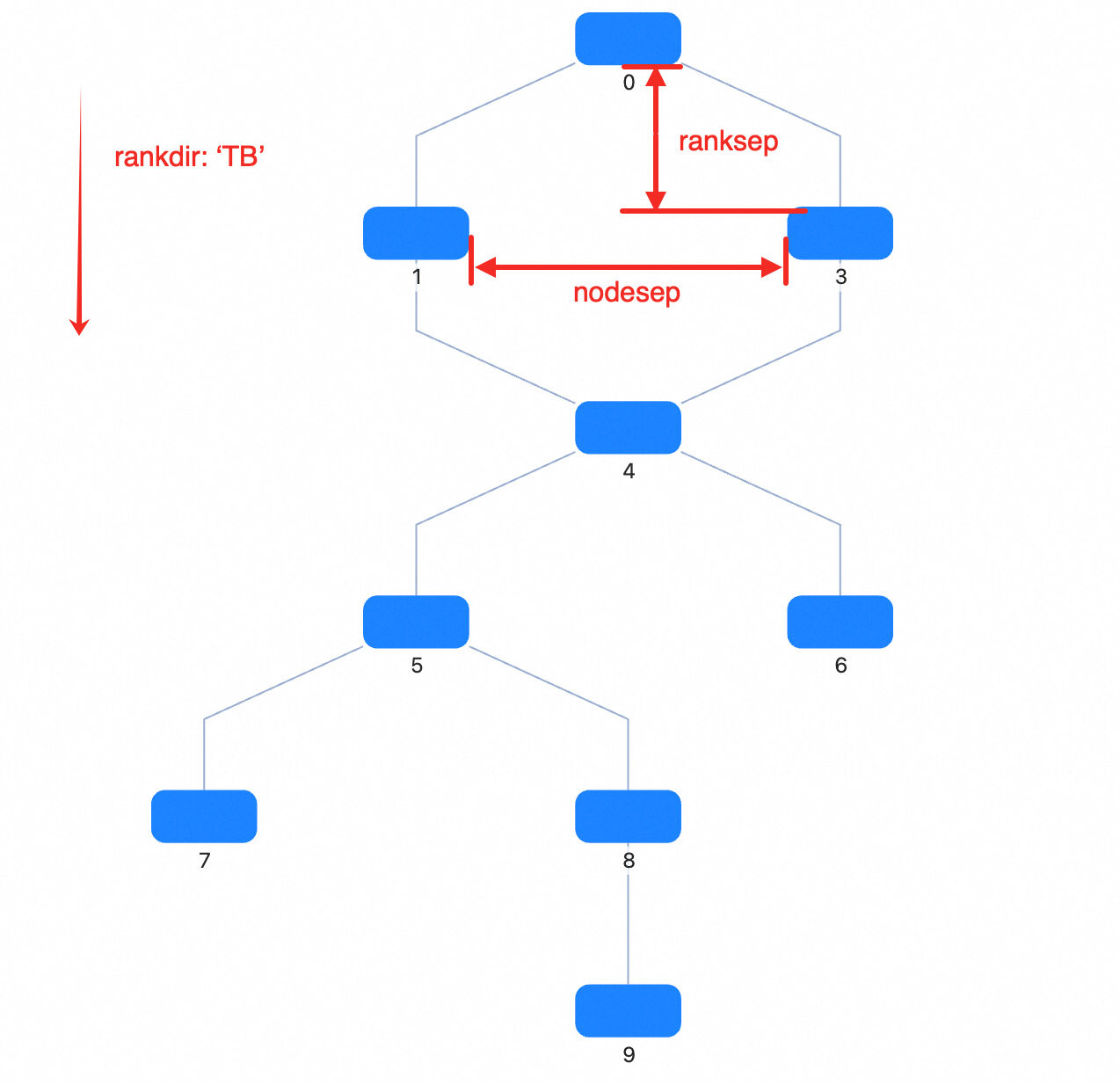
| Property | Description | Type | Default | Required |
|---|---|---|---|---|
| type | Layout type | dagre |
- | ✓ |
| rankdir | Layout direction, options | TB | BT | LR | RL |
TB |
|
| align | Node alignment, options | UL | UR | DL | DR |
UL |
|
| nodesep | Node spacing (px). For TB or BT, it is the horizontal spacing; for LR or RL, it is the vertical spacing |
number | 50 | |
| ranksep | Rank spacing (px). For TB or BT, it is the vertical spacing between adjacent ranks; for LR or RL, it is the horizontal spacing |
number | 100 | |
| ranker | Algorithm for assigning ranks to nodes: longest-path, tight-tree, or network-simplex |
network-simplex | tight-tree | longest-path |
network-simplex |
|
| directed | Whether to treat the graph as directed | boolean | true | |
| compound | Whether to support nested structures | boolean | true | |
| multigraph | Whether to allow multi-edges | boolean | true | |
| nodeSize | G6 custom property, specify node size for all or each node. If a single number, width and height are the same; if array: [width, height] |
number | number[] | () => (number | number[]) | [0, 0] | |
| edgeMinLen | Minimum number of ranks crossed by an edge | number | (edge) => number | 1 | |
| edgeWeight | Edge weight, used to affect optimization priority | number | (edge) => number | ||
| edgeLabelSize | Edge label size, used to reserve layout space | number[] | (edge) => number[] | ||
| edgeLabelPos | Edge label position | string | (edge) => string | ||
| edgeLabelOffset | Offset between the label and the edge | number | (edge) => number |
Note:
dagredoes not require configuringcontrolPointsseparately. G6 automatically converts the polyline points returned by the layout intostyle.controlPointson the edge.
rankdir
TB|BT|LR|RL, Default:TB
Layout direction
TB: Top to Bottom;

BT: Bottom to Top;
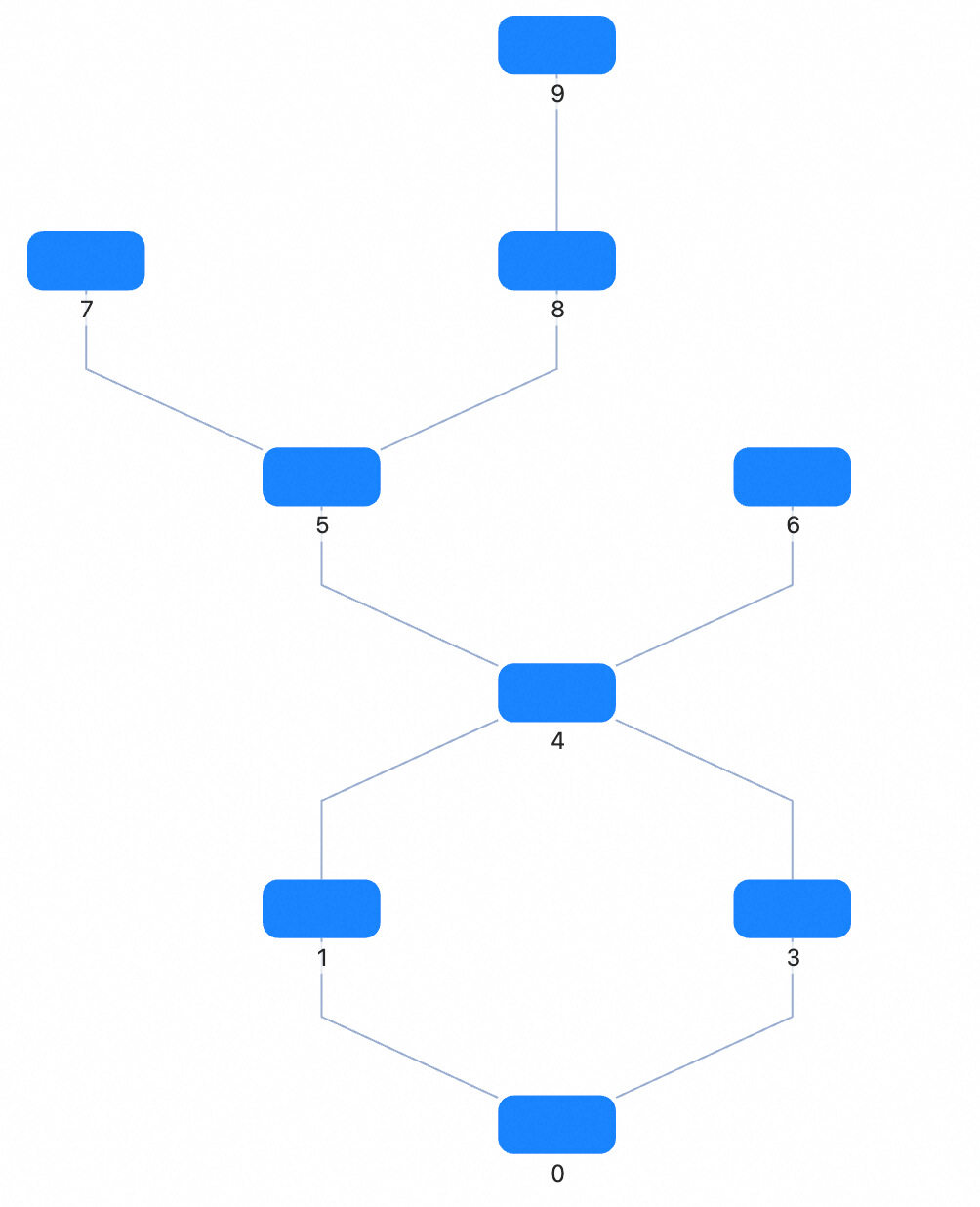
LR: Left to Right;

RL: Right to Left.

align
UL|UR|DL|DR, Default:UL
Node alignment
UL: Upper LeftUR: Upper RightDL: Down LeftDR: Down Right
nodesep
number, Default: 50
Node spacing (px). For TB or BT, it’s the horizontal spacing; for LR or RL, it’s the vertical spacing
ranksep
number, Default: 50
Rank spacing (px). For TB or BT, it’s the vertical spacing between ranks; for LR or RL, it’s the horizontal spacing between ranks
ranker
network-simplex|tight-tree|longest-path, Default:network-simplex
Algorithm for assigning ranks to nodes, supports three algorithms:
longest-path: Uses DFS to recursively find the longest path for each node. Simple and fast, but may result in many long edges.tight-tree: An optimization algorithm to reduce the number of long edges. It first useslongest-pathto compute initial ranks, then adjusts slack edges to build a feasible tree.network-simplex: Based on A Technique for Drawing Directed Graphs, iteratively modifies node ranks to minimize slack edges.
nodeSize
number | number[] | () => (number | number[])
G6 custom property, specify node size for all or each node. If a single number, width and height are the same; if array: [width, height]
(d) => {
  // d is a node
  if (d.id === 'testId') return 20;
  return [10, 20];
};
Applicable Scenarios
- Flowcharts: Suitable for displaying flowcharts, automatically handling direction and spacing between nodes.
- Dependency Graphs: Display dependencies between packages or modules.
- Task Scheduling Graphs: Show dependencies and execution order between tasks.
Related Documentation
The following documents can help you better understand Dagre layout