---
title: "AntV Dagre 布局 AntvDagre"
description: "AntV Dagre 布局 AntvDagre"
language: "zh"
canonical: "https://g6.antv.antgroup.com/zh/manual/layout/AntvDagreLayout/"
version: "5.1.1"
---
## 概述
AntvDagre 在原先[dagre](https://github.com/dagrejs/dagre/wiki)布局的基础上增加了更多有用的设置项,比如`nodeOrder`、`edgeLabelSpace`等等。 `dagre`布局本身一种层次化布局,适用于有向无环图(DAG)的布局场景,能够自动处理节点之间的方向和间距,支持水平和垂直布局。参考更多 Dagre 布局[样例](/zh/examples/layout/dagre/)或[源码](https://github.com/dagrejs/dagre/blob/master/lib/layout.js)以及[官方文档](https://github.com/dagrejs/dagre/wiki)。
 ## 配置方式
```js
const graph = new Graph({
layout: {
type: 'antv-dagre',
rankdir: 'TB',
align: 'UL',
nodesep: 50,
ranksep: 50,
controlPoints: false,
},
});
```
## 配置项
> 更多`dagre`原生配置项可参考[官方文档](https://github.com/dagrejs/dagre/wiki#configuring-the-layout),这里仅列出部分核心配置和新增的配置
## 配置方式
```js
const graph = new Graph({
layout: {
type: 'antv-dagre',
rankdir: 'TB',
align: 'UL',
nodesep: 50,
ranksep: 50,
controlPoints: false,
},
});
```
## 配置项
> 更多`dagre`原生配置项可参考[官方文档](https://github.com/dagrejs/dagre/wiki#configuring-the-layout),这里仅列出部分核心配置和新增的配置
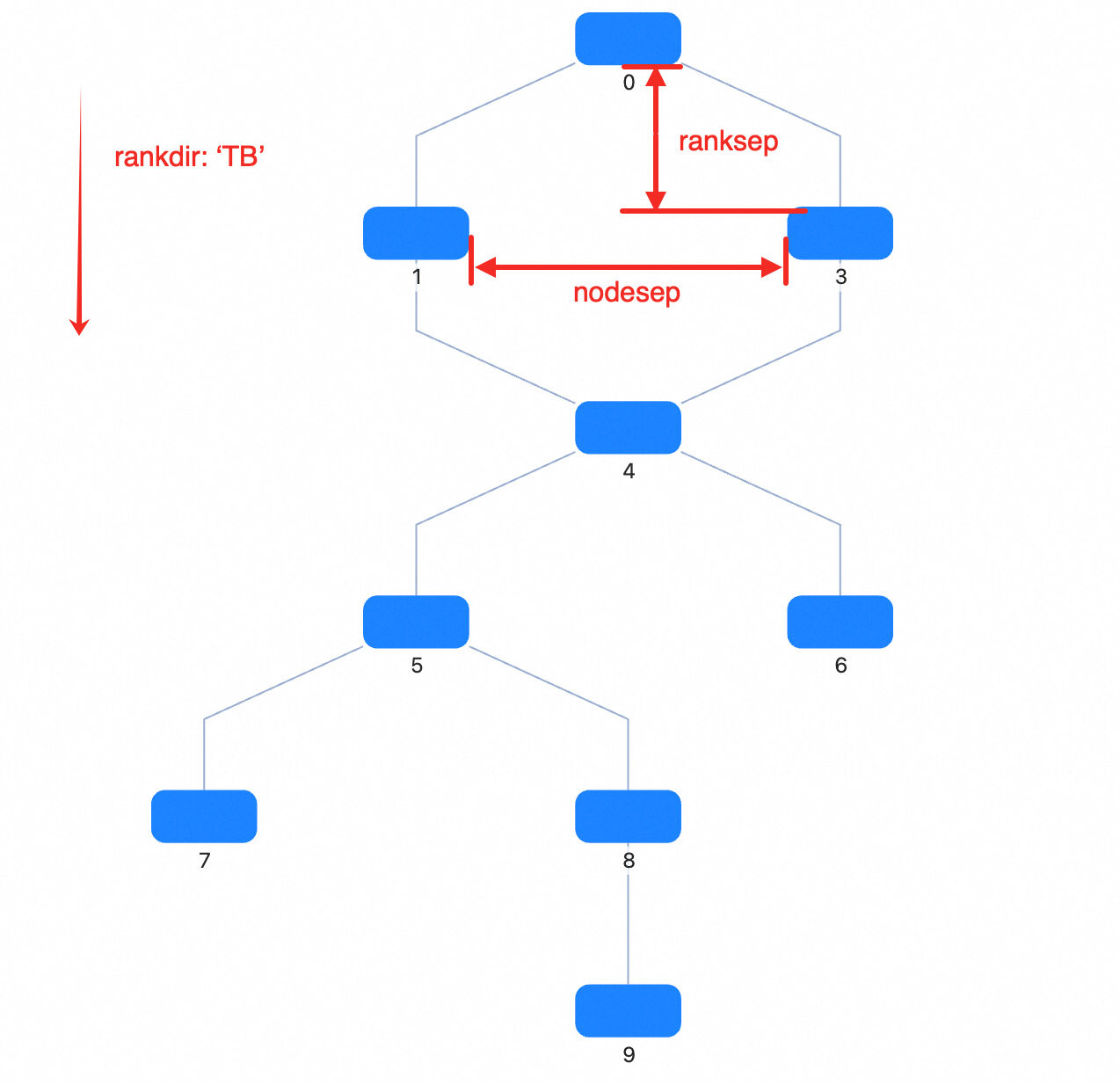 | 属性 | 描述 | 类型 | 默认值 | 必选 |
| -------------- | -------------------------------------------------------------------------------------------------------------------------------------------------- | --------------------------------------------------- | ------ | ---- |
| type | 布局类型 | `antv-dagre` | - | ✓ |
| rankdir | 布局方向,可选值 | `TB` \| `BT` \| `LR` \| `RL` | `TB` | |
| align | 节点对齐方式,可选值 | `UL` \| `UR` \| `DL` \| `DR` | `UL` | |
| nodesep | 节点间距(px)。在 rankdir 为 `TB` 或 `BT` 时是节点的水平间距;在 rankdir 为 `LR` 或 `RL` 时代表节点的竖直方向间距 | number | 50 | |
| nodesepFunc | 节点间距(px)的回调函数,优先级高于 `nodesep` | (d?: Node) => number | - | |
| ranksep | 层间距(px)。在 rankdir 为 `TB` 或 `BT` 时是竖直方向相邻层间距;在 rankdir 为 `LR` 或 `RL` 时代表水平方向相邻层间距 | number | 50 | |
| ranksepFunc | 层间距(px)的回调函数,优先级高于 `ranksep` | (d?: Node) => number | - | |
| ranker | 为每个节点分配等级的算法,共支持三种算法:`longest-path`、`tight-tree`、`network-simplex` | `network-simplex` \| `tight-tree` \| `longest-path` | - | |
| nodeSize | 统一指定或为每个节点指定节点大小,用于占位与间距计算 | Size \| ((nodeData: Node) => Size) | - | |
| controlPoints | 是否保留边的控制点,仅在边配置中使用了内置折线(type: 'polyline-edge')时,或任何将自定义消费了 `style.controlPoints` 字段作为控制点位置的边时生效 | boolean | false | |
| begin | 布局的左上角对齐位置 | [number, number] \| [number, number, number] | - | |
| sortByCombo | 同一层节点是否根据每个节点数据中的 `parentId` 进行排序,以防止 Combo 重叠 | boolean | false | |
| edgeLabelSpace | 是否为边的 label 预留位置 | boolean | true | |
| nodeOrder | 同层节点顺序的参考数组,存放节点 id 值 | string[] | - | |
| radial | 是否基于 `dagre` 进行辐射布局 | boolean | - | |
| focusNode | 关注的节点,仅在 `radial` 为 true 时生效 | ID \| Node \| null | - | |
| preset | 布局计算时参考的节点位置,一般用于切换数据时保证重新布局的连续性 | NodeData[] | - | |
> 补充:在 G6 中,`antv-dagre` 计算得到的控制点会被写入边的 `style.controlPoints`。
### align
> _DagreAlign_ **Default:** `UL`
节点对齐方式 U:upper(上);D:down(下);L:left(左);R:right(右)
- `UL`:对齐到左上角
- `UR`:对齐到右上角
- `DL`:对齐到左下角
- `DR`:对齐到右下角
### rankdir
> _DagreRankdir_ **Default:** `TB`
布局的方向。T:top(上);B:bottom(下);L:left(左);R:right(右)
- `TB`:从上至下布局
- `BT`:从下至上布局
- `LR`:从左至右布局
- `RL`:从右至左布局
### ranker
> _`network-simplex` \| `tight-tree` \| `longest-path`_
布局的模式
### ranksep
> _number_ **Default:** 50
层间距(px)
在 rankdir 为 'TB' 或 'BT' 时是竖直方向相邻层间距;在 rankdir 为 'LR' 或 'RL' 时代表水平方向相邻层间距。ranksepFunc 拥有更高的优先级
### ranksepFunc
> _(d?: Node) => number_
层间距(px)的回调函数
在 rankdir 为 'TB' 或 'BT' 时是竖直方向相邻层间距;在 rankdir 为 'LR' 或 'RL' 时代表水平方向相邻层间距。优先级高于 nodesep,即若设置了 nodesepFunc,则 nodesep 不生效
### nodesep
> _number_ **Default:** 50
节点间距(px)
在 rankdir 为 'TB' 或 'BT' 时是节点的水平间距;在 rankdir 为 'LR' 或 'RL' 时代表节点的竖直方向间距。nodesepFunc 拥有更高的优先级
### nodesepFunc
> _(d?: Node) => number_
节点间距(px)的回调函数,通过该参数可以对不同节点设置不同的节点间距
在 rankdir 为 'TB' 或 'BT' 时是节点的水平间距;在 rankdir 为 'LR' 或 'RL' 时代表节点的竖直方向间距。优先级高于 nodesep,即若设置了 nodesepFunc,则 nodesep 不生效
### begin
> _[number, number] \| [number, number, number]_ **Default:** undefined
布局的左上角对齐位置
### controlPoints
> _boolean_ **Default:** false
是否保留边的控制点,仅在边配置中使用了内置折线(type: 'polyline-edge') 时,或任何将自定义消费了 `style.controlPoints` 字段作为控制点位置的边时生效。本质上就是给边数据增加了 `style.controlPoints`
### edgeLabelSpace
> _boolean_ **Default:** true
是否为边的label留位置
这会影响是否在边中间添加dummy node
### focusNode
> _ID \| Node \| null_
关注的节点,注意,仅在`radial` 为 true 时生效
- ID: 节点 id
- Node: 节点实例
- null: 取消关注
### nodeOrder
> _string[]_ **Default:** undefined
同层节点顺序的参考数组,存放节点 id 值
若未指定,则将按照 dagre 本身机制排列同层节点顺序
### nodeSize
> _Size \| ((nodeData: Node) => Size)_ **Default:** undefined
统一指定或为每个节点指定节点大小。
用于防止节点重叠时的碰撞检测
### preset
> _OutNode[]_ **Default:** undefined
布局计算时参考的节点位置
一般用于切换数据时保证重新布局的连续性。在 G6 中,若是更新数据,则将自动使用已存在的布局结果数据作为输入
### radial
> _boolean_
是否基于 dagre 进行辐射布局
### sortByCombo
> _boolean_ **Default:** false
同一层节点是否根据每个节点数据中的 parentId 进行排序,以防止 Combo 重叠
建议在有 Combo 的情况下配置
## 布局适用场景
- **流程图**:适合展示流程图,节点之间的方向和间距会自动处理;
- **依赖关系图**:展示软件包或模块之间的依赖关系;
- **任务调度图**:展示任务之间的依赖关系和执行顺序。
## 相关文档
> 以下文档可以帮助你更好地理解 Dagre 布局
- [图布局算法|详解 Dagre 布局](https://mp.weixin.qq.com/s/EdyTfFUH7fyMefNSBXI2nA)
- [深入解读Dagre布局算法](https://www.yuque.com/antv/g6-blog/xxp5nl)
| 属性 | 描述 | 类型 | 默认值 | 必选 |
| -------------- | -------------------------------------------------------------------------------------------------------------------------------------------------- | --------------------------------------------------- | ------ | ---- |
| type | 布局类型 | `antv-dagre` | - | ✓ |
| rankdir | 布局方向,可选值 | `TB` \| `BT` \| `LR` \| `RL` | `TB` | |
| align | 节点对齐方式,可选值 | `UL` \| `UR` \| `DL` \| `DR` | `UL` | |
| nodesep | 节点间距(px)。在 rankdir 为 `TB` 或 `BT` 时是节点的水平间距;在 rankdir 为 `LR` 或 `RL` 时代表节点的竖直方向间距 | number | 50 | |
| nodesepFunc | 节点间距(px)的回调函数,优先级高于 `nodesep` | (d?: Node) => number | - | |
| ranksep | 层间距(px)。在 rankdir 为 `TB` 或 `BT` 时是竖直方向相邻层间距;在 rankdir 为 `LR` 或 `RL` 时代表水平方向相邻层间距 | number | 50 | |
| ranksepFunc | 层间距(px)的回调函数,优先级高于 `ranksep` | (d?: Node) => number | - | |
| ranker | 为每个节点分配等级的算法,共支持三种算法:`longest-path`、`tight-tree`、`network-simplex` | `network-simplex` \| `tight-tree` \| `longest-path` | - | |
| nodeSize | 统一指定或为每个节点指定节点大小,用于占位与间距计算 | Size \| ((nodeData: Node) => Size) | - | |
| controlPoints | 是否保留边的控制点,仅在边配置中使用了内置折线(type: 'polyline-edge')时,或任何将自定义消费了 `style.controlPoints` 字段作为控制点位置的边时生效 | boolean | false | |
| begin | 布局的左上角对齐位置 | [number, number] \| [number, number, number] | - | |
| sortByCombo | 同一层节点是否根据每个节点数据中的 `parentId` 进行排序,以防止 Combo 重叠 | boolean | false | |
| edgeLabelSpace | 是否为边的 label 预留位置 | boolean | true | |
| nodeOrder | 同层节点顺序的参考数组,存放节点 id 值 | string[] | - | |
| radial | 是否基于 `dagre` 进行辐射布局 | boolean | - | |
| focusNode | 关注的节点,仅在 `radial` 为 true 时生效 | ID \| Node \| null | - | |
| preset | 布局计算时参考的节点位置,一般用于切换数据时保证重新布局的连续性 | NodeData[] | - | |
> 补充:在 G6 中,`antv-dagre` 计算得到的控制点会被写入边的 `style.controlPoints`。
### align
> _DagreAlign_ **Default:** `UL`
节点对齐方式 U:upper(上);D:down(下);L:left(左);R:right(右)
- `UL`:对齐到左上角
- `UR`:对齐到右上角
- `DL`:对齐到左下角
- `DR`:对齐到右下角
### rankdir
> _DagreRankdir_ **Default:** `TB`
布局的方向。T:top(上);B:bottom(下);L:left(左);R:right(右)
- `TB`:从上至下布局
- `BT`:从下至上布局
- `LR`:从左至右布局
- `RL`:从右至左布局
### ranker
> _`network-simplex` \| `tight-tree` \| `longest-path`_
布局的模式
### ranksep
> _number_ **Default:** 50
层间距(px)
在 rankdir 为 'TB' 或 'BT' 时是竖直方向相邻层间距;在 rankdir 为 'LR' 或 'RL' 时代表水平方向相邻层间距。ranksepFunc 拥有更高的优先级
### ranksepFunc
> _(d?: Node) => number_
层间距(px)的回调函数
在 rankdir 为 'TB' 或 'BT' 时是竖直方向相邻层间距;在 rankdir 为 'LR' 或 'RL' 时代表水平方向相邻层间距。优先级高于 nodesep,即若设置了 nodesepFunc,则 nodesep 不生效
### nodesep
> _number_ **Default:** 50
节点间距(px)
在 rankdir 为 'TB' 或 'BT' 时是节点的水平间距;在 rankdir 为 'LR' 或 'RL' 时代表节点的竖直方向间距。nodesepFunc 拥有更高的优先级
### nodesepFunc
> _(d?: Node) => number_
节点间距(px)的回调函数,通过该参数可以对不同节点设置不同的节点间距
在 rankdir 为 'TB' 或 'BT' 时是节点的水平间距;在 rankdir 为 'LR' 或 'RL' 时代表节点的竖直方向间距。优先级高于 nodesep,即若设置了 nodesepFunc,则 nodesep 不生效
### begin
> _[number, number] \| [number, number, number]_ **Default:** undefined
布局的左上角对齐位置
### controlPoints
> _boolean_ **Default:** false
是否保留边的控制点,仅在边配置中使用了内置折线(type: 'polyline-edge') 时,或任何将自定义消费了 `style.controlPoints` 字段作为控制点位置的边时生效。本质上就是给边数据增加了 `style.controlPoints`
### edgeLabelSpace
> _boolean_ **Default:** true
是否为边的label留位置
这会影响是否在边中间添加dummy node
### focusNode
> _ID \| Node \| null_
关注的节点,注意,仅在`radial` 为 true 时生效
- ID: 节点 id
- Node: 节点实例
- null: 取消关注
### nodeOrder
> _string[]_ **Default:** undefined
同层节点顺序的参考数组,存放节点 id 值
若未指定,则将按照 dagre 本身机制排列同层节点顺序
### nodeSize
> _Size \| ((nodeData: Node) => Size)_ **Default:** undefined
统一指定或为每个节点指定节点大小。
用于防止节点重叠时的碰撞检测
### preset
> _OutNode[]_ **Default:** undefined
布局计算时参考的节点位置
一般用于切换数据时保证重新布局的连续性。在 G6 中,若是更新数据,则将自动使用已存在的布局结果数据作为输入
### radial
> _boolean_
是否基于 dagre 进行辐射布局
### sortByCombo
> _boolean_ **Default:** false
同一层节点是否根据每个节点数据中的 parentId 进行排序,以防止 Combo 重叠
建议在有 Combo 的情况下配置
## 布局适用场景
- **流程图**:适合展示流程图,节点之间的方向和间距会自动处理;
- **依赖关系图**:展示软件包或模块之间的依赖关系;
- **任务调度图**:展示任务之间的依赖关系和执行顺序。
## 相关文档
> 以下文档可以帮助你更好地理解 Dagre 布局
- [图布局算法|详解 Dagre 布局](https://mp.weixin.qq.com/s/EdyTfFUH7fyMefNSBXI2nA)
- [深入解读Dagre布局算法](https://www.yuque.com/antv/g6-blog/xxp5nl)